Creating immersive 360-degree videos presents unique challenges. From frustrating stitching errors to disappointing image quality, common issues can significantly impact the final product. This guide tackles four prevalent problems, offering practical solutions and best practices to elevate your 360° video production. We’ll explore techniques for seamless stitching, distortion correction, resolution enhancement, and more, empowering you to create polished, professional-looking videos.
Understanding the nuances of 360° video production is key to overcoming these hurdles. By addressing stitching issues, mitigating distortion, and optimizing resolution, you can unlock the full potential of this captivating medium. This guide provides a comprehensive approach, combining practical advice with detailed explanations to ensure you achieve the highest quality results.
Addressing Stitching Issues in 360° Video

Stitching errors are a common headache for 360° video producers, resulting in noticeable seams, ghosting, or distortions in the final output. These imperfections detract from the immersive experience and can make the video appear unprofessional. Understanding the causes of these issues and employing effective mitigation strategies is crucial for producing high-quality 360° content.
Common Causes of Stitching Errors
Several factors contribute to stitching problems. Inconsistent lighting between cameras, particularly variations in brightness or color temperature, can lead to noticeable seams where the images are joined. Camera movement during recording, especially rapid or jerky motions, makes it difficult for stitching software to accurately align the frames. Similarly, parallax errors, caused by slight differences in the perspectives of multiple cameras, can create ghosting or warping effects. Finally, using cameras with differing lens characteristics or employing improper camera calibration can also result in stitching failures. Addressing these issues requires careful planning and execution during the filming process and thoughtful post-processing.
Aligning Footage for Seamless Stitching
Proper alignment is paramount for successful stitching. Begin by ensuring all your cameras are properly calibrated. This involves verifying that their lenses are aligned and that their sensor outputs are consistent. Next, review your footage carefully before stitching. Identify any obvious misalignments or inconsistencies. Then, use your chosen stitching software’s alignment tools to adjust the positions and orientations of the individual camera feeds. This often involves manually adjusting keyframes throughout the video sequence, ensuring smooth transitions between shots. Some software provides automated alignment features, but manual refinement is frequently necessary for optimal results. Finally, meticulously examine the stitched output, paying close attention to areas where seams might appear.
Best Practices for Camera Placement and Movement
Careful camera placement and controlled movement significantly reduce stitching challenges. Maintain consistent lighting across all cameras. This might involve using external lighting sources or ensuring that the cameras are positioned in a location with even illumination. Avoid rapid or jerky camera movements. Smooth, deliberate movements are far easier for stitching software to handle. Keep cameras relatively stationary when possible. If movement is required, opt for slow, controlled pans or tilts rather than quick, erratic changes in position. Furthermore, maintain a consistent distance between cameras and the subject to minimize parallax errors. Planning your shots meticulously before filming will save significant time and effort during post-production.
Comparison of Stitching Software
Choosing the right stitching software is crucial. Different options offer varying features and capabilities. The best choice depends on your specific needs and budget.
| Software | Strengths | Weaknesses | Pricing |
|---|---|---|---|
| Kolor Autopano Video Pro | Powerful features, excellent results, good support | Can be expensive, steep learning curve | Commercial |
| PTGui | High-quality stitching, batch processing capabilities | Primarily for stills, less intuitive for video | Commercial |
| Adobe Premiere Pro (with plugins) | Integrated workflow with other Adobe products, user-friendly interface | Stitching capabilities depend on plugins, may not be as robust as dedicated software | Subscription |
| DaVinci Resolve (with plugins) | Powerful features, good for high-resolution video, free version available | Requires plugins for advanced stitching, can be resource-intensive | Free/Commercial |
Mitigating Distortion and Aberrations
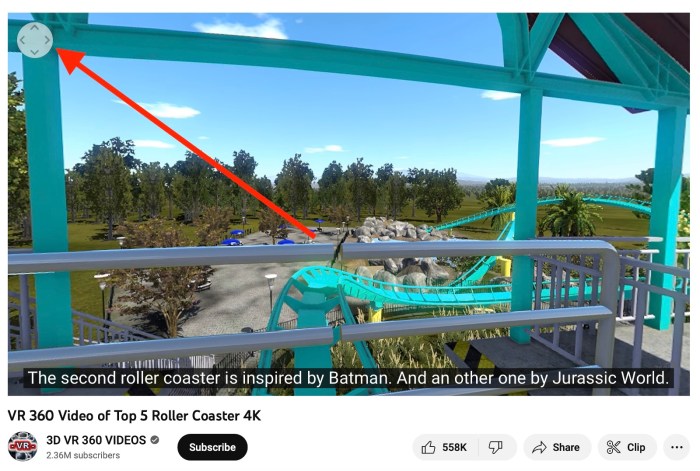
360° video presents unique challenges in image processing, primarily due to the wide field of view captured by the cameras. This often leads to noticeable lens distortion, impacting the overall viewing experience. Understanding the types of distortion and employing effective correction techniques is crucial for producing high-quality, immersive 360° content. This section will explore common distortion types and methods for their mitigation.
Lens distortion in 360° video is largely caused by the physics of lens design and the wide angle of view required to capture a complete spherical panorama. The most prevalent type is barrel distortion, characterized by straight lines appearing curved outwards from the center of the image. Pincushion distortion, the opposite effect where lines curve inwards, is less common but can still occur, particularly with certain lens designs or if the camera is improperly calibrated. Other aberrations, such as chromatic aberration (color fringing) and vignetting (darkening at the edges), can further degrade image quality.
Correcting Barrel Distortion and Other Aberrations
Post-production software plays a vital role in correcting these distortions. The process typically involves analyzing the image data to identify the distortion pattern and applying a mathematical transformation to counteract it. This is often achieved using specialized algorithms that map distorted pixels to their correct positions, resulting in a more accurate representation of the scene. More sophisticated software can also address other aberrations simultaneously, offering a streamlined workflow for distortion correction.
Software Tools for Distortion Correction
Several software applications offer robust tools for 360° video distortion correction. Kolor Autopano Video Pro, for example, is a popular choice known for its powerful stitching and distortion correction capabilities. It utilizes advanced algorithms to analyze the video frames and automatically correct various distortions, including barrel and pincushion distortion, chromatic aberration, and vignetting. Other options include PTGui, a dedicated stitching and panorama creation software, which also includes tools for correcting lens distortion. These applications often provide user-adjustable parameters allowing for fine-tuning of the correction process based on the specific needs of the project.
Preventative Measures to Reduce Distortion During Filming
Careful planning and execution during filming can significantly minimize the need for extensive post-production correction. Taking proactive steps reduces the workload and improves the final quality of the video.
- Use high-quality, well-calibrated 360° cameras. Calibration ensures the lenses are properly aligned, minimizing distortion from the outset.
- Employ cameras with low distortion lenses specifically designed for 360° video capture. These lenses are engineered to minimize the inherent distortion associated with wide-angle lenses.
- Maintain optimal camera settings. Proper exposure and white balance settings contribute to cleaner footage that is easier to correct in post-production.
- Avoid extreme perspectives and angles. Shooting scenes with minimal distortion-prone elements simplifies the correction process later on.
- Use a lens correction profile if available. Some camera manufacturers provide lens profiles specifically designed to correct the distortion of their lenses. Using this profile within the software during post-production can yield superior results.
Improving 360° Video Resolution and Clarity
Achieving high-resolution, crisp 360° video requires careful consideration of several factors throughout the production process. From the camera’s sensor and lens to the encoding method and post-processing techniques, numerous elements can influence the final video quality. Understanding these factors allows for optimization and the creation of visually stunning immersive experiences.
Factors Contributing to Low Resolution or Blurry Footage in 360° Videos encompass various aspects of the production pipeline. Low light conditions often result in noisy and grainy footage, while camera shake or movement can lead to blurry images. The camera’s sensor resolution directly impacts the final output, with lower resolution sensors naturally producing less detail. Furthermore, improper stitching of the individual camera feeds can introduce artifacts and blurring, particularly at the seams between the images. Finally, using compression techniques that are too aggressive can also significantly reduce the overall quality of the 360° video.
Encoding Methods and Their Impact on Video Quality
Different encoding methods offer varying levels of compression and impact on the final video quality. H.264, a widely used codec, offers a good balance between compression efficiency and quality, but can be computationally expensive. H.265 (HEVC), a more recent codec, provides better compression ratios at the same quality level or higher quality at the same bitrate, but requires more processing power for encoding and decoding. VP9, another option, offers similar advantages to H.265. The choice of codec often depends on the target platform and the desired balance between file size and visual fidelity. Higher bitrates generally lead to better quality but result in larger file sizes.
Optimizing Settings for Higher Resolution and Sharper Visuals
Optimizing settings for higher resolution and sharper visuals begins with understanding your camera’s capabilities. Shooting in the highest resolution possible is crucial, provided your storage and processing capacity can handle it. Maintaining proper exposure is paramount; avoid overexposure or underexposure, which can lead to loss of detail. Using appropriate image stabilization techniques, whether in-camera or through post-processing, minimizes blur caused by camera shake. Furthermore, selecting an appropriate encoding method and bitrate is essential for balancing file size and quality. Higher bitrates generally lead to higher quality but larger file sizes. Experimentation with different settings is key to finding the optimal balance for your specific needs and hardware.
Comparison of 360° Camera Models and Image Quality
The choice of 360° camera significantly impacts the final image quality. Different cameras offer varying sensor resolutions, lens quality, and processing capabilities. This table compares several popular models, illustrating the range of available options:
| Camera Model | Sensor Resolution | Lens Type | Image Quality Notes |
|---|---|---|---|
| Insta360 Pro 2 | 10K | Dual Fisheye | Excellent image quality, high dynamic range, but expensive. |
| GoPro Max | 5.6K | Dual Fisheye | Good image quality, relatively compact and affordable. |
| RICOH Theta Z1 | 23MP | Dual Fisheye | High resolution stills, good image quality for video, but can be computationally demanding. |
| Samsung Gear 360 (2017) | 4K | Dual Fisheye | Older model, lower resolution than newer options, but still functional for less demanding projects. |
Final Wrap-Up
Mastering 360-degree video production requires attention to detail and a systematic approach to problem-solving. By implementing the strategies Artikeld in this guide – addressing stitching, correcting distortion, enhancing resolution, and optimizing your workflow – you’ll significantly improve the quality and impact of your videos. Remember, practice and experimentation are crucial. Embrace the learning process, and soon you’ll be creating stunning, immersive 360° experiences.