Augmented reality (AR) offers transformative potential, seamlessly blending the digital and physical worlds. However, realizing this potential requires navigating several common challenges. From technical hurdles like latency and tracking inaccuracies to user experience issues such as motion sickness and cognitive overload, AR development presents a unique set of obstacles. This guide addresses seven prevalent problems, offering practical solutions and best practices to enhance the development and user experience of AR applications.
We’ll explore technical aspects such as optimizing 3D models, selecting appropriate tracking methods, and managing content updates effectively. Equally important is understanding and mitigating the user experience challenges, including designing intuitive interfaces and ensuring accessibility for users with disabilities. By addressing these critical areas, developers can create more robust, engaging, and user-friendly AR experiences.
Technical Challenges in AR Development

Developing engaging and functional augmented reality applications presents several significant technical hurdles. These challenges stem from the inherent complexities of overlaying computer-generated imagery onto the real world in real-time, requiring precise tracking, processing power, and robust software design. Overcoming these challenges is crucial for creating seamless and believable AR experiences.
Occlusion and its Solutions
Occlusion, the realistic blocking of virtual objects by real-world objects, is a critical aspect of creating believable AR experiences. Without proper occlusion, virtual objects appear to float in space, breaking the illusion of integration with the real world. For instance, imagine an AR game where a virtual monster is supposed to be behind a real-world tree; if the monster is visible through the tree, the experience is jarring and unrealistic. Solutions involve sophisticated depth sensing techniques, such as using depth cameras or structured light projection, to accurately map the real-world environment and render virtual objects accordingly. Advanced rendering techniques, such as using alpha blending and transparency maps, can also help to create a more realistic occlusion effect. Furthermore, integrating advanced computer vision algorithms can help to identify and interpret the depth information from the camera feed more accurately.
Latency and its Mitigation Strategies
Latency, the delay between a user’s action and the AR system’s response, is another significant challenge. High latency can lead to a disjointed and frustrating user experience, especially in interactive applications like AR games or training simulations. For example, if a user tries to interact with a virtual object and there’s a noticeable delay before the system responds, the experience becomes less immersive and less enjoyable. Reducing latency requires optimizing the application’s processing efficiency, using powerful hardware, and employing techniques like predictive tracking to anticipate user actions. Cloud-based processing can also offload some of the computational burden to reduce latency on the user’s device. Careful selection of algorithms and data structures can further minimize delays.
Tracking Issues and their Resolution
Accurate and robust tracking is fundamental to a successful AR application. Tracking refers to the system’s ability to determine the position and orientation of the device in the real world. Difficulties arise from variations in lighting conditions, environmental clutter, and the movement of the device itself. For example, if the AR system loses track of the device’s position, virtual objects may appear to jump or disappear unexpectedly, disrupting the user experience. Solutions involve the use of multiple sensors, such as cameras, IMUs (Inertial Measurement Units), and GPS, to provide redundant tracking information. Robust algorithms, capable of handling noisy sensor data and adapting to changing environments, are essential. Using visual features, such as corners and edges, to improve tracking accuracy is another crucial strategy. Furthermore, integrating SLAM (Simultaneous Localization and Mapping) techniques can enhance the robustness of tracking in unknown environments.
AR Tracking Methods Comparison
The following table compares three common AR tracking methods: marker-based, markerless, and SLAM.
| Tracking Method | Accuracy | Processing Power | Robustness to Environmental Changes |
|---|---|---|---|
| Marker-based | High, within marker boundaries | Low | Low; requires specific markers |
| Markerless | Moderate to High, depending on environment | Moderate to High | Moderate; susceptible to lighting changes and clutter |
| SLAM | Moderate to High, improving over time | High | High; can adapt to new environments |
AR Application Development Flowchart
The following describes a simplified flowchart illustrating the development process and potential failure points.
Imagine a flowchart with these steps:
1. Concept and Design: Defining the AR experience and its functionalities. *Failure Point:* Poorly defined concept leading to design flaws.
2. Environment Mapping and 3D Model Creation: Creating or sourcing 3D models and mapping the real-world environment. *Failure Point:* Inaccurate or incomplete environment mapping.
3. AR Engine Selection and Integration: Choosing an appropriate AR engine (e.g., ARKit, ARCore) and integrating it into the application. *Failure Point:* Engine incompatibility or improper integration.
4. Tracking Implementation: Implementing the chosen tracking method (marker-based, markerless, SLAM). *Failure Point:* Poor tracking performance due to inadequate algorithm selection or hardware limitations.
5. Occlusion Handling: Implementing techniques to handle occlusion realistically. *Failure Point:* Unrealistic or missing occlusion.
6. User Interface (UI) Design: Designing the user interface for interacting with virtual objects. *Failure Point:* Poorly designed UI impacting usability.
7. Testing and Iteration: Rigorous testing and iterative improvements based on feedback. *Failure Point:* Insufficient testing leading to bugs and poor user experience.
8. Deployment and Maintenance: Deploying the application to target platforms and ongoing maintenance. *Failure Point:* Deployment issues or lack of maintenance leading to app instability.
User Experience (UX) and Design Issues in AR
Augmented reality (AR) applications, while offering exciting possibilities, present unique challenges in user experience (UX) design. Successfully integrating AR into everyday life requires careful consideration of several factors that can significantly impact user satisfaction and adoption. Failing to address these issues can lead to frustration, disengagement, and ultimately, the failure of the application.
Effective AR UX design must address potential problems stemming from the technology’s inherent nature, including the integration of digital content into the real world, the limitations of current hardware, and the cognitive load placed on users. This requires a multi-faceted approach, incorporating principles of intuitive interface design, accessibility considerations, and a deep understanding of human-computer interaction in a three-dimensional space.
Motion Sickness in AR Applications
Motion sickness in AR is a significant concern, particularly in applications that involve rapid camera movements or significant discrepancies between the user’s perceived movement and the virtual environment. This occurs because the brain receives conflicting sensory information: the eyes see movement in the virtual world, but the inner ear (vestibular system) may not sense corresponding physical movement. This can lead to nausea, dizziness, and discomfort, deterring users from further engagement. For example, a first-person shooter game with highly dynamic camera movement might induce motion sickness in some users. Mitigating this involves using techniques like minimizing jarring movements, implementing smooth transitions, and providing options for adjusting the field of view. Careful consideration of camera movement speed and stability is crucial.
Cognitive Overload in AR Interfaces
AR applications often present users with a wealth of information simultaneously – overlaying digital content onto the real world. If not carefully managed, this can lead to cognitive overload, where users struggle to process the information efficiently. For instance, an AR navigation app that displays too many waypoints, points of interest, and directional arrows at once could overwhelm the user. Best practices include prioritizing information, using clear visual hierarchies, and employing techniques like progressive disclosure (revealing information gradually as needed) to manage the cognitive load. Minimizing visual clutter and ensuring that information is presented in a clear, concise, and easily digestible manner is essential.
Difficulty with Interaction in AR Environments
Interacting with AR applications can be challenging due to the limitations of current input methods. Gestures, voice commands, and touch interfaces are common, but each presents unique difficulties. For example, precise gesture recognition can be unreliable, and voice commands may not be suitable in noisy environments. A poorly designed AR interface relying heavily on imprecise gesture controls could result in frustrating user experiences. Designing intuitive and robust interaction mechanisms is crucial. This includes providing clear visual feedback to confirm user actions and employing alternative interaction methods where appropriate, such as a combination of gestures and voice commands, or even physical controllers in specific scenarios.
Best Practices for Designing Intuitive and Engaging AR Interfaces
Designing intuitive AR interfaces requires a focus on clarity, simplicity, and user-centered design. Effective UI elements should be visually distinct from the real world, yet seamlessly integrated. This includes using clear visual cues to indicate interactive elements, employing consistent design language, and providing informative feedback to user actions. Consideration should be given to spatial relationships between real and virtual objects, ensuring that virtual elements are appropriately scaled and positioned within the user’s visual field. Furthermore, incorporating principles of Gestalt psychology, such as proximity, similarity, and closure, can aid in creating visually appealing and easy-to-understand interfaces. For example, using clear visual cues, like highlighting interactive elements with a subtle glow or animation, can significantly improve usability.
Accessibility in AR Design
Creating accessible AR applications is crucial for ensuring inclusivity. Several considerations must be made to accommodate users with disabilities.
Designing for accessibility in AR requires careful consideration of various user needs and limitations. It is essential to go beyond mere compliance with accessibility guidelines and strive to create truly inclusive experiences.
- Visual impairments: Incorporate alternative auditory cues and haptic feedback for users with visual impairments. For example, an AR navigation app could provide verbal instructions alongside visual cues.
- Hearing impairments: Provide visual alternatives to auditory cues, such as text-based notifications or visual representations of sounds. A game that uses sound effects to indicate danger should also use visual cues.
- Motor impairments: Offer alternative input methods such as voice control or adaptive controllers for users with limited motor skills. A user with limited hand mobility might benefit from a voice-activated AR application.
- Cognitive impairments: Simplify the interface and provide clear, concise instructions. Avoid using complex terminology or overwhelming amounts of information. An AR educational app for individuals with cognitive impairments should use simple language and visual aids.
Content Creation and Management for AR
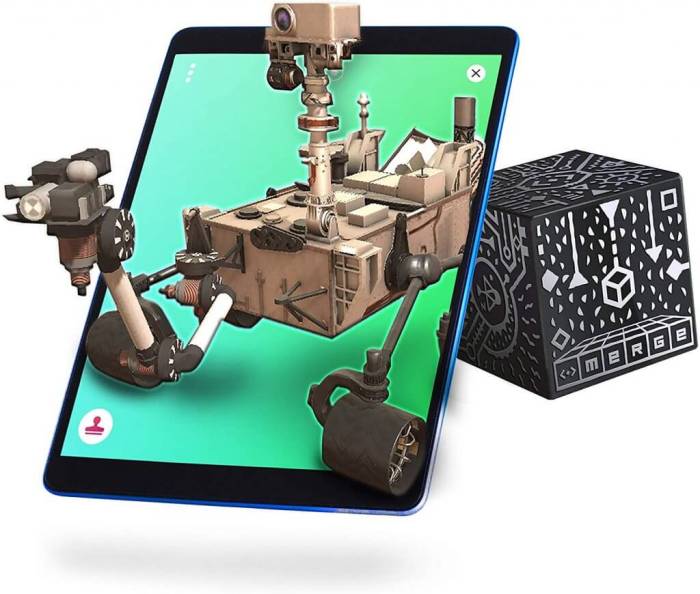
Creating engaging and effective augmented reality experiences hinges on the quality and efficient management of AR content. This involves not only the creation of high-quality 3D models and other assets but also robust systems for organizing, updating, and deploying this content across various platforms and devices. This section will delve into the challenges and best practices for managing the content lifecycle in AR development.
Challenges in Creating High-Quality 3D Models and AR Content
Developing high-quality 3D models and other AR content presents several significant hurdles. Firstly, creating realistic and visually appealing 3D models requires specialized software and expertise in 3D modeling, texturing, and animation. The process is time-consuming and resource-intensive, demanding significant computational power and skilled personnel. Secondly, optimizing these models for AR applications necessitates careful consideration of polygon count, texture resolution, and file size to ensure smooth performance on diverse devices with varying processing capabilities. Overly complex models can lead to lag, crashes, or poor user experience. Finally, ensuring consistent quality across different platforms and devices adds another layer of complexity. Different AR platforms may have varying requirements and limitations, demanding further optimization efforts.
Optimizing 3D Models for AR Applications
The process of creating and optimizing 3D models for AR applications typically involves several key steps. Initially, a 3D model is created using software such as Blender, Maya, or 3ds Max. This model is then textured, adding visual detail and realism. Subsequently, the model undergoes optimization, reducing the polygon count and texture resolution while preserving visual fidelity. Tools like Blender’s decimate modifier or specialized baking software can be used to achieve this. Finally, the model is exported in a suitable format, such as FBX or glTF, optimized for the target AR platform. For example, a model intended for mobile AR applications will require significantly lower polygon counts than one intended for a high-end headset. Throughout this process, rigorous testing on target devices is crucial to ensure optimal performance and visual quality.
Efficiently Managing and Updating AR Content
Efficient content management is critical for maintaining and updating AR applications. This involves employing version control systems like Git to track changes and collaborate effectively among developers. Asset management systems, such as cloud-based platforms, are essential for storing, organizing, and accessing 3D models, textures, and other assets. These systems allow for centralized management and easy retrieval of assets, reducing the risk of version conflicts and ensuring consistency across the development team. A well-defined asset naming convention is also important for easy identification and organization of assets.
Remotely Updating AR Content: A Step-by-Step Procedure
Updating AR content remotely involves several steps. First, the updated assets are prepared and tested thoroughly. Then, these updated assets are uploaded to a cloud-based storage service or content delivery network (CDN). The AR application is designed to check for updates periodically or upon launch. When an update is detected, the application downloads the new assets from the cloud storage or CDN. Finally, the application seamlessly integrates the updated assets, ensuring a smooth user experience. For example, a retail application might remotely update product information and 3D models without requiring users to download a new app version.
Integrating Various Content Types into an AR Application
Seamless integration of diverse content types enhances the richness and engagement of AR experiences. Effective content integration requires careful planning and a well-structured application architecture. Below is a sample structure for organizing AR content within an AR application:
- Content Library: A centralized repository for all AR assets (3D models, images, videos, audio). This library should be well-organized using folders and a clear naming convention.
- Scene Management: A system for managing and loading different AR scenes. Each scene can contain multiple assets and interactions.
- Asset Loading and Rendering: Efficient mechanisms for loading and rendering assets based on user location, device capabilities, and scene context.
- Content Update Mechanism: A system for remotely updating assets and configuration data without requiring a new application version.
- User Interaction Management: A system that handles user input (touch, gestures, voice) and triggers corresponding actions and animations within the AR scene.
Closure

Successfully deploying an AR application hinges on overcoming its inherent challenges. By understanding and proactively addressing the technical, user experience, and content management issues discussed here, developers can significantly improve the quality, usability, and overall success of their AR projects. Remember that continuous iteration and user feedback are crucial for refining AR applications and ensuring a positive user experience. The path to creating impactful AR experiences requires careful planning, robust development practices, and a user-centric approach.