Augmented reality (AR) technology, while rapidly advancing, still faces significant hurdles impacting user experience. From frustratingly narrow fields of view to debilitating motion sickness and unreliable tracking, these challenges hinder widespread AR adoption. This guide delves into three prevalent AR problems – limited field of view, motion sickness, and tracking instability – offering practical solutions and insights into future technological advancements poised to overcome these limitations.
Understanding these issues is crucial for developers and users alike. By addressing these core problems, we can pave the way for a more immersive, comfortable, and reliable AR experience, unlocking the full potential of this transformative technology. We will explore both current mitigation strategies and promising future innovations.
Limited Field of View in AR Applications

A narrow field of view (FOV) is a significant limitation in current augmented reality (AR) headsets, hindering the immersive experience and practical applications of the technology. This constraint stems from a combination of technical challenges related to both hardware and software components. Overcoming this limitation is crucial for wider adoption and more compelling AR experiences.
Technical Limitations Contributing to Narrow Fields of View
The limited FOV in current AR headsets is primarily due to the challenges in miniaturizing and efficiently projecting images onto a user’s retina while maintaining sufficient resolution and brightness. Current display technologies, such as microdisplays and waveguides, have physical limitations in the size and angular extent of the projected image. Furthermore, the optical components used to guide and focus the light onto the eye often introduce distortions and limitations in the FOV. The complexity of integrating multiple optical elements and ensuring a high-quality image across a wide viewing angle adds to the technological hurdle. Computational processing power required to render and display high-resolution images across a wider FOV also presents a challenge.
Approaches to Expanding the Field of View
Several approaches are being explored to expand the FOV in AR headsets. One method involves using multiple cameras to capture a wider field of view and then computationally stitch the images together to create a panoramic view. This approach requires sophisticated algorithms for image registration and blending to avoid seams and distortions. Another approach focuses on advancements in optical design, utilizing innovative lens systems such as freeform optics or diffractive optics to achieve a wider FOV while minimizing distortions. These advanced optical systems can be more complex and expensive to manufacture, but they offer the potential for significant improvements in FOV. Finally, the use of advanced display technologies, like holographic displays or light field displays, could potentially lead to much wider FOVs.
Hypothetical AR Application Mitigating Limited Field of View
Consider a hypothetical AR application for navigation in a large, unfamiliar building. A limited FOV would make it difficult to simultaneously view directional cues and the surrounding environment. To mitigate this, the application could use a heads-up display (HUD) style interface, displaying only crucial navigational information (e.g., directional arrows, distance to destination) directly in the user’s line of sight. The user interface could also incorporate a “zoom” function, allowing them to quickly expand their view of specific areas of interest without needing a wide FOV. This focused information delivery prioritizes essential data, reducing reliance on a large visual field.
Potential of Future Technologies
Waveguide technology shows significant promise for overcoming FOV limitations. Waveguides use a thin, transparent waveguide to guide light from a smaller display to the user’s eye, effectively expanding the apparent size of the display. This technology is already being implemented in some AR headsets and offers the potential for a much wider FOV compared to traditional microdisplay-based systems. Further advancements in waveguide design, such as using more efficient light coupling mechanisms or integrating multiple waveguides, could lead to even larger FOVs and improved image quality.
Field of View Comparison of AR Devices
| Device Name | Field of View (Horizontal) | Field of View (Vertical) | Technology Used |
|---|---|---|---|
| Microsoft HoloLens 2 | 52° | 35° | Waveguide |
| Magic Leap 2 | 70° | 40° | Waveguide |
| Meta Quest Pro | 106° | 96° | LCD |
| Apple Vision Pro | ~100° | ~80° | Micro-OLED |
Motion Sickness and Discomfort from AR Use
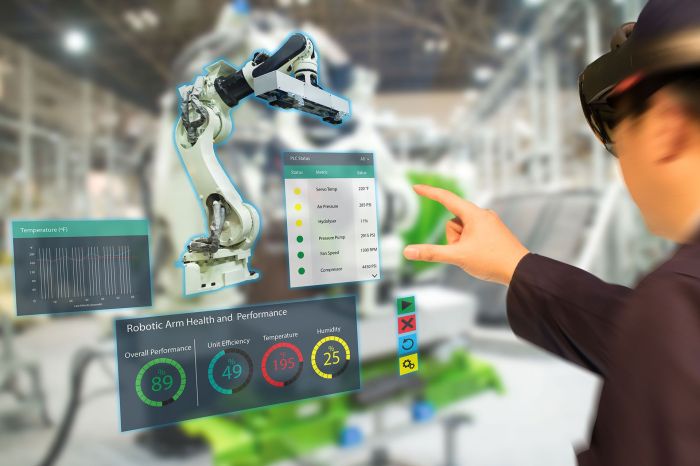
Augmented reality (AR) applications, while offering immersive and engaging experiences, can unfortunately induce motion sickness and discomfort in a significant portion of users. This stems from a mismatch between what the user’s visual system perceives and what their vestibular system (inner ear) senses. Understanding the underlying physiological factors and employing effective design strategies are crucial for creating comfortable and enjoyable AR experiences.
Physiological Factors Contributing to AR-Induced Motion Sickness
Motion sickness arises from a sensory conflict. The visual system, through the AR display, might show movement that the vestibular system doesn’t detect, or vice versa. This discrepancy can trigger nausea, dizziness, and disorientation. Factors like the speed and type of movement depicted in the AR overlay, the latency between head movements and the corresponding visual updates, and the overall visual stability of the AR experience all play significant roles in exacerbating this conflict. Furthermore, individual susceptibility varies greatly, influenced by factors such as pre-existing motion sickness proneness and the user’s overall health.
Minimizing Motion Sickness Through AR Application Design
Effective AR application design can significantly mitigate motion sickness. Maintaining a high frame rate (ideally 60fps or higher) is paramount; lower frame rates introduce noticeable jerkiness and lag, intensifying the sensory conflict. Minimizing latency, the delay between head movement and the corresponding visual update, is equally important. A high-latency system forces the user’s brain to reconcile conflicting sensory information, leading to discomfort. Visual stability, achieved through smooth and consistent rendering, is also critical. Avoiding rapid or jarring movements within the AR overlay contributes significantly to a more comfortable experience.
The Role of User Personalization and Adaptive Rendering
User personalization offers a powerful tool in combating motion sickness. Allowing users to adjust parameters like field of view, rendering quality, and even the level of visual interaction can significantly enhance comfort. Adaptive rendering techniques, where the system dynamically adjusts the rendering quality based on the user’s movement and head tracking data, can further improve the experience. For example, during periods of rapid head movement, the system could temporarily reduce the level of detail in the AR overlay to maintain a high frame rate and reduce latency. This provides a balance between visual fidelity and comfort.
Strategies for Compensating for Head Tracking Latency
Several strategies exist for mitigating the effects of head tracking latency. Predictive tracking algorithms can anticipate the user’s head movements and render the AR overlay accordingly, reducing the noticeable delay. Techniques like temporal reprojection, which re-uses previously rendered frames to compensate for latency, can also be employed. Furthermore, careful calibration of the head tracking system is crucial to minimize inaccuracies that contribute to latency. The choice of head tracking technology itself plays a significant role; some technologies inherently offer lower latency than others.
Examples of AR Applications Addressing Motion Sickness
Several successful AR applications have prioritized user comfort. Pokémon Go, for example, uses relatively simple graphics and avoids rapid, jarring movements in the AR overlay. While it doesn’t completely eliminate motion sickness, its design choices minimize its occurrence. Other applications employ adaptive rendering techniques, dynamically adjusting the rendering quality based on user movement to maintain smooth performance and visual stability. These applications often incorporate user feedback mechanisms, allowing users to adjust settings to personalize their experience and optimize comfort levels.
Accuracy and Stability of AR Tracking and Registration
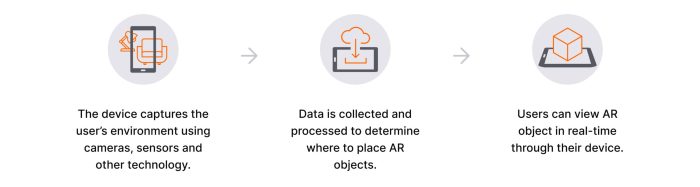
Achieving accurate and stable registration of virtual objects within a real-world environment is crucial for a positive user experience in augmented reality applications. Inaccurate tracking leads to jarring misalignments, breaking the illusion and rendering the AR experience unusable. This section delves into the complexities of AR tracking, exploring various technologies, challenges, and optimization strategies.
AR Tracking Technologies
Several technologies underpin AR tracking, each with its strengths and limitations. The choice of technology often depends on the application’s requirements, including accuracy needs, computational resources, and environmental constraints.
- Marker-based Tracking: This relies on visually distinct markers (e.g., QR codes) that the system recognizes and uses to determine its position and orientation. It offers high accuracy and stability within the marker’s field of view but lacks flexibility and is limited to pre-defined markers.
- Markerless Tracking: This approach uses features in the real-world environment (e.g., edges, corners, textures) to track the device’s position and orientation. It offers greater flexibility than marker-based tracking, but accuracy can be affected by lighting conditions, texture variations, and occlusions.
- Simultaneous Localization and Mapping (SLAM): SLAM algorithms build a 3D map of the environment while simultaneously tracking the device’s location within that map. This is commonly used in mobile AR applications and provides robust tracking in dynamic environments, but can be computationally intensive.
- Inertial Measurement Units (IMUs): IMUs, comprising accelerometers and gyroscopes, measure the device’s movement. While offering high temporal resolution, they are prone to drift over time, requiring frequent recalibration or fusion with other tracking modalities.
Challenges in Achieving Accurate and Stable Registration
Accurate registration requires precise alignment of virtual objects with their corresponding real-world locations. Several factors complicate this process. For instance, maintaining consistent tracking across varied lighting conditions presents a significant hurdle. Changes in illumination can dramatically alter the appearance of features used for tracking, leading to inaccuracies. Similarly, the presence or absence of sufficient texture in the environment impacts tracking reliability. Smooth, featureless surfaces provide little information for the tracking system to latch onto. Occlusion, where virtual objects are partially or completely hidden by real-world objects, further complicates registration, requiring sophisticated occlusion handling techniques. Finally, computational constraints and processing power limitations can restrict the real-time performance and accuracy of tracking algorithms.
Environmental Factors Affecting Tracking Accuracy
Lighting conditions, surface textures, and occlusions are significant environmental factors influencing tracking accuracy. Bright sunlight can wash out features, while low light can make it difficult for the system to identify key points. Smooth surfaces lack the distinctive features necessary for robust tracking, while highly textured surfaces can lead to ambiguous matches. Occlusion, where real-world objects obstruct the view of tracked features, introduces significant challenges in maintaining accurate registration. For example, a virtual chair placed behind a real sofa may disappear or become distorted as the tracking system loses sight of the chair’s features.
Comparison of Object Recognition and Pose Estimation Algorithms
Several algorithms are employed for object recognition and pose estimation in AR systems. A common approach is to use feature detection and matching techniques, such as SIFT (Scale-Invariant Feature Transform) or SURF (Speeded-Up Robust Features), to identify corresponding features in the real and virtual worlds. These algorithms aim to identify features that are invariant to changes in scale, rotation, and viewpoint. Other techniques, such as deep learning-based methods, have shown promising results in object recognition and pose estimation, offering higher accuracy and robustness. However, these deep learning models often require substantial training data and computational resources.
| Algorithm | Strengths | Weaknesses |
|---|---|---|
| SIFT | Robust to scale, rotation, and viewpoint changes | Computationally expensive |
| SURF | Faster than SIFT | Less robust to significant viewpoint changes |
| Deep Learning-based methods | High accuracy and robustness | Requires large training datasets and computational resources |
Optimizing Tracking and Registration Performance
Optimizing the tracking and registration performance of an AR application involves a multi-faceted approach.
- Select appropriate tracking technology: Choose a tracking method that aligns with the application’s requirements and environmental constraints. Marker-based tracking is suitable for controlled environments, while markerless tracking or SLAM are better suited for dynamic environments.
- Optimize lighting conditions: Ensure sufficient and consistent lighting to avoid issues with feature detection. Avoid extreme variations in lighting or direct sunlight.
- Improve surface texture: If possible, design the application’s environment to include sufficient texture for robust tracking. Avoid smooth, featureless surfaces.
- Implement occlusion handling: Incorporate algorithms to manage occlusions, predicting the position of occluded objects and maintaining consistent registration.
- Utilize sensor fusion: Combine data from multiple sensors (e.g., camera, IMU) to improve tracking accuracy and robustness. Sensor fusion can compensate for the limitations of individual sensors.
- Optimize algorithms: Select efficient algorithms for object recognition and pose estimation, balancing accuracy and computational cost. Consider using hardware acceleration to improve real-time performance.
- Iterative refinement: Employ iterative refinement techniques to continuously adjust the registration based on new sensor data and feedback from the environment.
Concluding Remarks
Addressing the challenges of limited field of view, motion sickness, and inaccurate tracking is vital for the continued growth and success of augmented reality. While technological limitations remain, innovative solutions in optics, software design, and user interface development are continuously emerging. By focusing on user comfort and experience, and by embracing ongoing technological advancements, we can create more engaging and accessible AR applications for everyone.