Email phishing remains a persistent threat, costing individuals and organizations significant amounts of money and sensitive data annually. Understanding the tactics employed by phishers and developing effective countermeasures is crucial for maintaining online security. This guide provides a practical approach to identifying, responding to, and ultimately preventing common phishing scams, empowering you to navigate the digital landscape with increased confidence and security.
We will explore three prevalent phishing techniques, analyzing their characteristics and highlighting red flags to watch for. Furthermore, we will Artikel a structured approach to handling suspicious emails, emphasizing safe practices and procedures to protect your personal information. Finally, we will discuss proactive measures to enhance your email security and minimize your vulnerability to future attacks.
Identifying Phishing Emails
Phishing emails are designed to trick you into revealing sensitive information like passwords, credit card details, or social security numbers. Recognizing the tactics used in these deceptive emails is crucial for protecting yourself from online threats. Understanding the common red flags will significantly improve your ability to identify and avoid falling victim to phishing scams.
Common Phishing Email Tactics and Red Flags
Phishing emails employ various deceptive tactics to appear legitimate. Recognizing these tactics and their associated red flags is key to avoiding these scams. The following table highlights three common tactics and their corresponding warning signs.
| Phishing Tactic | Red Flag | Example | Action to Take |
|---|---|---|---|
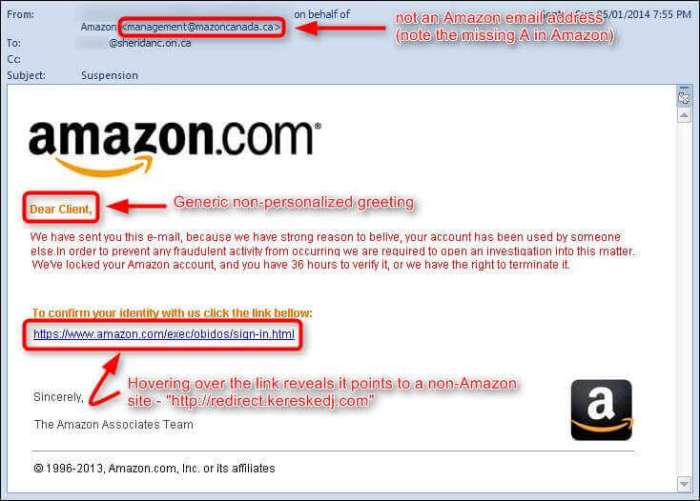
| Spoofed Sender Address | Email address doesn’t match the organization’s known address; look for inconsistencies in the domain name. | Email appears to be from “[email protected]” instead of “[email protected]”. | Hover over links to see the actual URL; check the sender’s email address carefully. |
| Urgent Requests | Demands immediate action, often using threats or promises of rewards to create a sense of urgency. | Email claims your account will be suspended unless you act within the hour. | Never rush into clicking links or providing information. Take time to verify the request. |
| Suspicious Links | Links appear legitimate but redirect to malicious websites; the URL may contain misspellings or unusual characters. | A link claiming to go to “paypal.com” actually leads to “paypa1.com”. | Hover over links to see the actual URL before clicking. Avoid clicking links directly in emails. |
Suspicious Email Subject Lines
The subject line is often the first indication of a phishing email. Phishers use compelling subject lines to entice recipients to open the email. Examples of suspicious subject lines include:
Phishing emails frequently utilize urgent and attention-grabbing subject lines to increase the likelihood of the recipient opening the email. These lines often create a false sense of urgency or importance.
- Urgent Security Alert: Your Account Has Been Compromised
- You Have a Package Awaiting Delivery
- Your Password Needs Immediate Updating
- Congratulations! You’ve Won a Prize!
- Suspicious Activity on Your Account
Identifying Spoofed Email Addresses and Domain Names
Spoofed email addresses are designed to mimic legitimate sender addresses. Several techniques can help identify these spoofs:
Identifying spoofed email addresses requires careful scrutiny of the email header and the visual presentation of the sender’s information. These techniques help in uncovering fraudulent attempts to impersonate legitimate organizations.
- Check the “From” Field Carefully: Examine the email address closely for misspellings, extra characters, or unusual domain names. A slight variation can indicate a spoofed address.
- Hover Over Links: Before clicking any links, hover your mouse over them to see the actual URL. This reveals the true destination of the link, exposing any discrepancies between the displayed text and the actual URL.
- Examine the Email Header: The email header contains detailed information about the email’s journey. While not always easily accessible, this information can reveal inconsistencies that indicate spoofing. Look for mismatches between the “From” field and other header information.
Anatomy of a Phishing Email
Imagine a phishing email visually. The top would display a seemingly legitimate sender’s name (e.g., a bank or online retailer), but the email address itself, upon closer inspection, may reveal slight differences or inconsistencies (e.g., an extra character or a slightly altered domain name). The subject line would be attention-grabbing and urgent, often containing warnings or promises. The body of the email would likely contain a sense of urgency, perhaps threatening account suspension or promising a reward. Within the body, there would be a prominent call to action, a link that appears legitimate but leads to a fake website designed to steal your credentials. This fake website would closely mimic the legitimate website, aiming to deceive you into entering your personal information. Finally, there would be subtle grammatical errors or unprofessional language that may indicate a lack of legitimacy. The overall impression is one of urgency and legitimacy, designed to manipulate the recipient into taking action without careful consideration.
Responding to Suspicious Emails
Dealing with a potentially malicious email requires a calm and methodical approach. Panicked reactions can lead to mistakes, potentially compromising your security. The following steps Artikel a safe and effective procedure for handling suspected phishing attempts.
Remember, prevention is always better than cure. While the steps below help mitigate damage, proactive measures significantly reduce your risk of falling victim to phishing attacks in the first place.
Handling Suspicious Emails: A Step-by-Step Procedure
- Do Not Click Any Links or Open Attachments: This is the most crucial step. Phishing emails often contain malicious links or attachments that can infect your computer with malware or steal your information. Resist the urge to click, even out of curiosity.
- Carefully Examine the Email Header and Sender Information: Look for inconsistencies. Does the sender’s email address match the organization it claims to represent? Check for misspellings in the email address or the organization’s name. Hover your cursor over links (without clicking) to see the actual URL – it might differ from what’s displayed.
- Report the Email: Most email providers have a built-in mechanism to report phishing emails. Use this feature to alert your provider and help protect others. Many organizations also have specific email addresses for reporting suspected phishing attempts.
- Delete the Email: Once you’ve reported it, delete the email immediately. Do not keep it in your inbox or any other folders.
- Verify Directly with the Organization: If you’re unsure about the legitimacy of an email requesting information or action, contact the organization directly using a phone number or email address you know to be authentic (not one from the suspicious email).
Best Practices for Protecting Personal Information
Protecting yourself from phishing attacks requires a multi-layered approach. Here are five key best practices:
Implementing these practices creates a strong defense against phishing attacks. Consistency is key; these measures should be part of your regular online habits.
- Strong Passwords and Multi-Factor Authentication (MFA): Use unique, strong passwords for all your online accounts and enable MFA wherever possible. MFA adds an extra layer of security, requiring a second form of verification (like a code from your phone) to access your account, even if someone has your password.
- Regular Software Updates: Keep your operating system, antivirus software, and other applications updated. Updates often include security patches that address vulnerabilities that phishers could exploit.
- Be Wary of Urgent or Unexpected Emails: Phishing emails often create a sense of urgency to pressure you into acting quickly without thinking. Legitimate organizations rarely communicate with such urgency.
- Hover Over Links Before Clicking: Always check the actual URL of a link before clicking. Phishing emails often use links that look legitimate but redirect to malicious websites.
- Educate Yourself and Others: Stay informed about the latest phishing techniques. Share your knowledge with friends and family to help protect them as well.
Verifying Email Authenticity
Before responding to any email requesting personal information or action, verify the sender’s identity. Don’t rely solely on the displayed name or email address.
Several methods exist to confirm authenticity. Employing multiple methods strengthens your verification process significantly.
- Check the Email Header: The email header contains technical information about the email’s journey. It can reveal the email’s true origin and help identify potential spoofing.
- Contact the Organization Directly: Use a known phone number or email address from the organization’s official website to confirm the email’s legitimacy.
- Look for Security Indicators: Legitimate organizations often use security measures like SSL certificates (indicated by a padlock icon in the browser’s address bar) on their websites. Phishing websites typically lack these.
- Examine the Email Content for Errors: Look for grammatical errors, typos, or inconsistencies in branding and messaging. Legitimate organizations usually maintain a high standard of professionalism in their communications.
Reporting Phishing Emails
Reporting phishing emails is crucial to help protect others and combat phishing campaigns.
Various resources are available to report these malicious emails. Using these channels helps law enforcement and email providers take action against the perpetrators.
- Your Email Provider: Most email providers have a built-in reporting mechanism for suspicious emails.
- The Anti-Phishing Working Group (APWG): The APWG is a global organization dedicated to combating phishing and other online fraud. They provide resources and reporting mechanisms.
- Federal Trade Commission (FTC): In the United States, the FTC is a federal agency that receives and investigates reports of phishing and other online scams.
- National Cyber Security Centre (NCSC) (UK): In the UK, the NCSC is the government agency responsible for national cyber security.
Protecting Yourself from Future Phishing Attacks
Proactive measures are crucial in mitigating the risk of future phishing attacks. By strengthening your email security settings, improving your awareness, and employing robust authentication protocols, you can significantly reduce your vulnerability. This section details practical strategies to enhance your email security and safeguard against future phishing attempts.
Improving Email Security Settings
Implementing robust email security settings is a fundamental step in preventing phishing attacks. Three key areas to focus on are password management, two-factor authentication (2FA), and email filtering. Strong, unique passwords, regularly changed, are essential. Two-factor authentication adds an extra layer of security by requiring a second verification method, such as a code sent to your phone, in addition to your password. Enabling advanced spam and phishing filters within your email provider’s settings can significantly reduce the number of malicious emails reaching your inbox. These filters often use sophisticated algorithms to identify and quarantine suspicious emails based on various factors, including sender reputation and email content analysis.
Identifying and Blocking Suspicious Senders and Domains
Most email clients offer tools to manage blocked senders and domains. This allows you to proactively prevent emails from known or suspected phishing sources from reaching your inbox. If you receive a phishing email, immediately add the sender’s email address and domain to your blocked senders list. Many email providers also allow you to create filters based on s or phrases commonly found in phishing emails, enabling you to automatically sort or delete suspicious messages before they reach your inbox. For example, if you frequently receive emails with subject lines containing urgent requests for financial information, you can create a filter to automatically move these emails to a designated folder for review. Regularly reviewing your blocked senders and filters is important to maintain their effectiveness.
Email Authentication Protocols: SPF and DKIM
SPF (Sender Policy Framework) and DKIM (DomainKeys Identified Mail) are two widely used email authentication protocols designed to verify the authenticity of email senders. SPF works by checking if the sender’s IP address is authorized to send emails on behalf of the domain. DKIM, on the other hand, uses digital signatures to verify that an email hasn’t been tampered with during transit. While both aim to prevent email spoofing, they achieve this through different mechanisms. SPF focuses on the sender’s IP address, while DKIM focuses on the email’s content integrity. The combination of both SPF and DKIM provides a stronger defense against phishing attempts, offering a more comprehensive approach to email authentication. Many reputable email providers support and encourage the implementation of these protocols.
Checklist for Minimizing Phishing Vulnerability
Developing good email security habits is vital for minimizing your risk. The following checklist Artikels key actions to take:
- Use strong, unique passwords for all your online accounts, including email.
- Enable two-factor authentication (2FA) wherever possible.
- Regularly update your email client and operating system software to patch security vulnerabilities.
- Be cautious of unsolicited emails, especially those requesting personal information or containing suspicious links.
- Hover over links before clicking to check the actual URL.
- Never click on links or download attachments from unknown or untrusted sources.
- Report suspicious emails to your email provider and relevant authorities.
- Regularly review your blocked senders and email filters.
- Educate yourself and your family about common phishing tactics.
Concluding Remarks
By mastering the techniques Artikeld in this guide, you can significantly reduce your risk of falling victim to email phishing scams. Remember, vigilance and proactive security measures are your best defenses. Staying informed about the latest phishing tactics and regularly updating your security practices are essential components of maintaining a secure online presence. Proactive protection is far more effective than reactive damage control. Take control of your digital security today.