Frustrated with your 3D printer? Recurring issues like failed extrusion, poor layer adhesion, and warping can be incredibly disheartening. This guide dives into seven common 3D printing problems, providing practical solutions and preventative measures to help you achieve consistently successful prints. We’ll explore the root causes of these issues, offering step-by-step troubleshooting guides and insightful tips to optimize your printing process. From nozzle clogs to warping woes, we’ve got you covered.
Whether you’re a seasoned 3D printing enthusiast or a curious beginner, understanding these common pitfalls and their solutions is crucial for maximizing your printer’s potential and minimizing frustrating downtime. This comprehensive guide will equip you with the knowledge and techniques to overcome these challenges and produce high-quality prints time and time again.
Troubleshooting No Extrusion
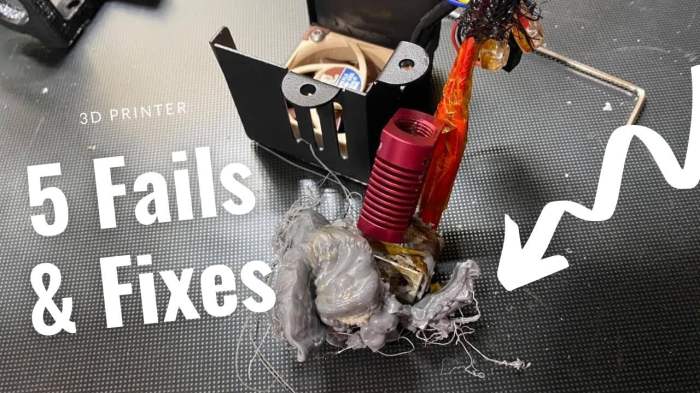
No extrusion, meaning your 3D printer isn’t feeding filament, is a frustratingly common problem. This issue can stem from several sources, ranging from simple clogs to more significant mechanical failures. Understanding the potential causes and systematically troubleshooting them is key to getting your prints back on track.
Clogged Nozzles and Their Resolution
A clogged nozzle is a frequent culprit behind failed extrusion. This occurs when molten filament solidifies within the nozzle’s narrow opening, blocking the flow. Several factors contribute to nozzle clogging, including the use of improperly dried filament, a nozzle temperature that’s too low, or the presence of filament debris within the nozzle. Effective troubleshooting involves a combination of preventative measures and active cleaning techniques.
Preventative measures include ensuring your filament is thoroughly dry (using a desiccant or dehydrator if necessary), selecting the appropriate nozzle temperature for your filament type, and regularly cleaning your nozzle to remove any buildup.
To clear a clogged nozzle, try these steps:
- Heat the Nozzle: Heat the nozzle to the recommended temperature for your filament. This will soften any solidified plastic.
- Manual Cleaning: Use a needle or a thin piece of wire to carefully remove any obstructions from the nozzle opening. Be gentle to avoid damaging the nozzle.
- Cold Pull Method: If the clog persists, try the cold pull method. This involves retracting the filament slightly, then rapidly cooling the nozzle (e.g., by using compressed air or a cooling fan). The solidified filament should pull away from the nozzle as it contracts.
- Solvent Cleaning (Caution): As a last resort, carefully use a small amount of isopropyl alcohol (IPA) to dissolve any stubborn residue. This should be done with the nozzle heated and with proper ventilation, as IPA is flammable.
Nozzle Replacement
If cleaning efforts fail, replacing the nozzle is often the most effective solution. This process is relatively straightforward:
- Turn off and unplug the printer. Safety first!
- Allow the nozzle to cool completely. This prevents burns and damage.
- Loosen the nozzle. Use the appropriate wrench (usually a small open-end wrench) to carefully unscrew the nozzle from the hotend. Some nozzles may require more force than others.
- Remove the old nozzle. Once loosened, gently remove the old nozzle.
- Clean the hotend threads. Use a small brush or compressed air to remove any debris from the hotend threads.
- Install the new nozzle. Carefully screw the new nozzle onto the hotend, ensuring it is tightly seated but not over-tightened.
- Reconnect and test. Reconnect the printer, preheat the nozzle, and run a test extrusion.
Nozzle Material Comparison
| Filament Type | Nozzle Material | Temperature (°C) | Notes |
|---|---|---|---|
| PLA | Brass | 190-220 | Most common and cost-effective option for PLA. |
| ABS | Brass or hardened steel | 220-250 | Hardened steel is recommended for its abrasion resistance. |
| PETG | Hardened steel or ruby | 230-260 | High-temperature filament; hardened steel or ruby are preferred to avoid wear. |
| TPU | Hardened steel or ruby | 220-240 | Abrasive; hardened steel or ruby are necessary to minimize wear. |
Addressing Layer Adhesion Issues

Layer adhesion problems, where printed layers fail to stick together properly, are a common frustration for 3D printing enthusiasts. This often results in warped prints, peeling layers, or complete print failures. Understanding the contributing factors and implementing effective solutions is crucial for achieving successful prints.
Factors Affecting Layer Adhesion
Several factors can contribute to poor layer adhesion. These include insufficient bed adhesion (the first layer not sticking to the print bed), insufficient inter-layer adhesion (layers not sticking to each other), and issues related to the printing process itself. A combination of these factors often leads to adhesion problems. For example, a warped print bed might cause poor initial bed adhesion, while insufficient print temperature could lead to weak inter-layer bonds.
Improving Bed Adhesion
Effective bed adhesion is paramount for a successful print. Several techniques can improve this. Proper bed leveling is essential to ensure consistent distance between the nozzle and the print bed. This is typically achieved through a process of adjusting the nozzle height at various points on the bed, often using a feeler gauge or auto-bed leveling system. Many printers offer automated bed leveling features, simplifying the process. Beyond leveling, applying an adhesive to the print bed can significantly enhance adhesion. Common adhesives include glue sticks, hairspray, painter’s tape, or specialized 3D printer adhesion solutions. The choice of adhesive depends on the print material and print bed surface. For example, a glass bed might benefit from a specialized adhesive, while a PEI (Polyetheretherketone) coated bed may require less or no adhesive.
Impact of Print Temperature and Speed
Print temperature and speed significantly influence layer adhesion. Too low a temperature can result in insufficient material flow and weak inter-layer bonds, leading to layers that peel or separate. Conversely, too high a temperature can cause the material to be too runny, leading to poor layer definition and adhesion issues. Similarly, printing too fast can result in insufficient time for the material to bond properly between layers, while printing too slowly can increase the risk of warping or stringing. Finding the optimal temperature and speed for your specific material and printer is crucial through experimentation and reference to material datasheets. For example, PLA typically prints well around 190-220°C, while ABS often requires temperatures around 230-260°C. These ranges can vary based on the specific filament brand and printer model.
Troubleshooting Layer Adhesion Problems
The following flowchart Artikels a systematic approach to troubleshooting layer adhesion issues:
Solving Warping and Curling Problems

Warping and curling are common 3D printing woes, resulting in deformed prints that are unusable. These issues stem from uneven cooling and adhesion problems between the printed layer and the print bed. Understanding the causes and implementing appropriate solutions is crucial for successful 3D printing.
Warping occurs when the edges of a print lift from the print bed during printing, often creating a noticeable curl. This is primarily due to differences in cooling rates between the center and edges of the print. The center cools slower, retaining more heat and causing the edges, which cool faster and contract, to pull away. Insufficient bed adhesion exacerbates this problem.
Causes of Warping and Curling
Several factors contribute to warping and curling. These include the material’s inherent properties (some filaments are more prone to warping than others), insufficient bed adhesion, uneven bed temperature, and drafts or vibrations in the printing environment. Poorly configured print settings, such as overly fast cooling, also play a significant role. Large, thin prints are especially susceptible because of the increased surface area relative to volume.
Solutions for Preventing Warping
Several techniques effectively mitigate warping. The most common include using a heated bed, applying a brim or raft, and adjusting print settings.
Heated Bed Usage
A heated bed maintains a consistent temperature across the print bed, improving adhesion and reducing the temperature differential between the center and edges of the print. This minimizes the stress that causes warping. The optimal temperature varies depending on the filament material; ABS, for instance, typically requires a higher bed temperature than PLA.
Brim and Raft Application
A brim adds a thin, wide base around the print, increasing the contact area with the bed. This improves adhesion, particularly at the edges, preventing lifting. A raft, on the other hand, creates a larger, thicker base, offering even more support. Both techniques are effective but add extra material to the final print.
Print Setting Adjustments
Careful configuration of print settings is crucial. Reducing the print speed, especially during the initial layers, allows for better adhesion and reduces the stress on the edges of the print. Lowering the first layer height can also improve adhesion by increasing contact with the bed. Increasing the bed adhesion temperature can help with sticking the first layer to the print bed. Finally, adjusting the cooling fan speed can affect the cooling rate, impacting warping. A slower cooling rate can reduce warping, but may compromise layer adhesion in some cases.
Materials and Techniques for Improved Bed Adhesion
Improving bed adhesion is key to preventing warping. Several materials and techniques can help.
Improving Bed Adhesion
- Using a suitable adhesive: A glue stick, hairspray, or specialized 3D printing adhesive can enhance bed adhesion, particularly with materials like ABS that are challenging to print.
- Cleaning the print bed: A clean print bed is essential for good adhesion. Regular cleaning with isopropyl alcohol removes residue and ensures a smooth surface.
- Using a PEI (Polyetheretherketone) sheet: PEI offers excellent adhesion properties and is easy to clean.
- Leveling the print bed: Proper bed leveling is paramount. An uneven bed leads to inconsistent adhesion, increasing the risk of warping.
Last Word
Mastering 3D printing involves understanding and overcoming its inherent challenges. By addressing the seven common problems discussed—from extrusion failures to warping—you’ll significantly improve print success rates and unlock the full potential of your 3D printer. Remember, consistent maintenance, proper filament selection, and careful calibration are key to long-term success. With the right knowledge and a systematic approach, you can confidently tackle any printing obstacle and create stunning, high-quality 3D prints.