Are you constantly bombarded by social media notifications, feeling overwhelmed and losing precious time? Many struggle with the incessant stream of alerts, impacting productivity and even mental well-being. This guide tackles two prevalent issues: managing notification overload and dealing with irrelevant or spam notifications. We’ll explore practical strategies to regain control, optimize your notification settings, and reclaim your focus.
From customizing notification sounds and scheduling silence periods to identifying and blocking spam sources, we’ll provide actionable steps for various platforms like Facebook, Instagram, and Twitter. Learn how to tailor your notification preferences for a more peaceful and productive digital experience, minimizing distractions and maximizing your time.
Overwhelmed by Notifications
The constant barrage of notifications from various social media platforms can be incredibly disruptive and overwhelming. Many users find themselves trapped in a cycle of checking their phones, only to be bombarded with a flood of updates, many of which are irrelevant or unimportant. This can lead to decreased productivity, increased stress, and a general feeling of being out of control. Effectively managing your notifications is crucial for reclaiming your time and mental well-being.
Managing Notification Settings for Reduced Overload
Taking control of your notification settings is the first step towards a less stressful digital life. This involves carefully reviewing and adjusting the types of notifications you receive from each platform. The process varies slightly between platforms, but the underlying principle remains the same: selectively choose which notifications are truly important and disable the rest.
- Identify Unwanted Notifications: Begin by spending some time observing the types of notifications you receive. Which ones are genuinely useful and which ones are distracting or unnecessary? Make a note of these.
- Access Notification Settings: Each platform has a dedicated section for managing notifications. This is usually found within the app’s settings menu. For example, on Facebook, you’d typically navigate to Settings & Privacy > Notifications; on Instagram, it’s usually under Settings > Notifications.
- Customize Notification Preferences: Once in the notification settings, you’ll find options to customize various aspects, such as the types of notifications you receive (e.g., comments, likes, friend requests, messages), the frequency of notifications (e.g., instant, daily digest), and the platforms you receive them from (e.g., mobile app, email, browser).
- Disable Unnecessary Notifications: Carefully review each notification category and disable those that you’ve identified as unnecessary or distracting. For instance, you might choose to turn off notifications for comments on old posts or likes on your Instagram stories.
- Test and Refine: After making changes, take some time to observe the impact of your adjustments. You might need to fine-tune your settings over time to find the optimal balance between staying informed and avoiding notification overload.
Visual Guide to Notification Management
Below are descriptions of the notification settings interfaces for two popular platforms:
Facebook: Imagine a screenshot showing the Facebook notification settings menu. The screen displays various categories like “Posts,” “Friends,” “Groups,” “Events,” and “Pages.” Each category has a toggle switch allowing users to turn notifications on or off, and some offer further granular control, such as choosing to receive notifications only for comments from friends or specific pages. A clear “Customize” button is visible for each category, allowing users to refine their notification preferences further.
Instagram: The Instagram notification settings screenshot would display options for “Posts,” “Stories,” “Live,” “Messages,” “Follow Requests,” and “Other.” Each option would have a toggle to turn notifications on or off, along with additional options for selecting the notification type (e.g., push notifications, email notifications). The user interface is clean and intuitive, with clear labels and easy-to-understand toggles.
Comparison of Notification Customization Options
| Platform | Feature | Description | Ease of Use (1-5) |
|---|---|---|---|
| Granular Control over Notification Types | Allows users to customize notifications for specific categories like posts, comments, events, and groups. | 4 | |
| Push vs. Email Notifications | Offers the choice between receiving notifications via push notifications to the mobile app or email. | 5 | |
| Muted Words and Accounts | Allows users to filter out notifications from specific accounts or containing specific s. | 3 | |
| Notification Frequency | Users can choose to receive notifications instantly or as a daily summary. | 4 | |
| Notification Sound Customization | Users can select a custom sound for their notifications or disable sounds altogether. | 5 | |
| Notification Filtering by Type | Allows filtering notifications based on type (e.g., mentions, retweets, replies). | 4 |
Psychological Impact of Constant Notifications and Management Strategies
The constant influx of social media notifications can trigger a release of dopamine, creating a sense of reward and encouraging repetitive checking behavior. This can lead to anxiety and a fear of missing out (FOMO). Studies have shown a correlation between excessive social media use and increased levels of stress, anxiety, and depression.
Strategies for managing notification-induced anxiety include:
- Scheduled Check-Ins: Instead of constantly checking notifications, designate specific times throughout the day to review them. This helps to regain control over your time and reduce the urge to constantly check.
- Mindfulness and Meditation: Practicing mindfulness techniques can help to reduce stress and anxiety associated with social media usage. Meditation can help to cultivate a sense of calm and focus.
- Digital Detox: Regularly taking breaks from social media can help to reset your relationship with technology and reduce the impact of constant notifications. Even short breaks can make a difference.
- Turn Off Notifications Completely: Consider turning off notifications altogether for a period of time to see how it affects your well-being. You can always re-enable them later if needed.
Dealing with Irrelevant or Spam Notifications
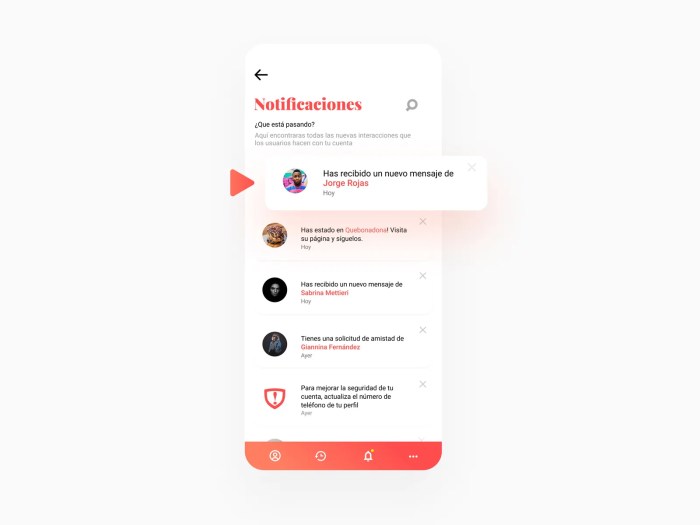
Social media notifications, while intended to keep us connected, can quickly become a source of frustration if overwhelmed by irrelevant or spam content. This section focuses on identifying, managing, and mitigating these unwanted notifications to reclaim control over your online experience. We’ll explore effective strategies to filter out the noise and maintain a more manageable notification stream.
Irrelevant or spam notifications often manifest as unsolicited friend requests from unknown accounts, promotional messages from businesses you don’t follow, or notifications related to content you’ve shown no interest in. These can range from seemingly harmless advertisements to more aggressive attempts at phishing or malware distribution. Recognizing these patterns is the first step in effectively managing them.
Identifying and Reporting Spam or Irrelevant Notifications
Identifying spam notifications usually involves recognizing patterns. Common examples include notifications promoting get-rich-quick schemes, unsolicited messages containing suspicious links, or repetitive notifications from accounts you don’t recognize or haven’t interacted with. Many platforms offer a reporting mechanism; typically a button or link labeled “Report Spam,” “Report,” or a similar phrase, located near the notification itself. Reporting these notifications helps social media companies identify and remove malicious accounts or content. After reporting, you should generally delete or archive the notification to prevent it from reappearing.
Blocking Specific Users or Accounts
Blocking users is a straightforward method for silencing unwanted notifications. The process varies slightly depending on the platform and whether you are using a mobile app or a desktop website. For example, on most platforms, you can find a block option within the user’s profile or within the notification itself. This action prevents the blocked user from sending you messages, friend requests, or from tagging you in posts. On mobile apps, blocking typically involves navigating to the user’s profile, tapping the three-dot menu (or similar), and selecting the “Block” option. On desktop versions, the process is similar but often involves clicking on a menu button or dropdown associated with the user’s profile.
Notification Filtering Techniques
Effective notification management often involves a combination of techniques. The effectiveness of each method depends on the specific platform and individual preferences.
- Customizing Notification Settings: Most platforms allow granular control over notification types. You can choose to receive only notifications from specific accounts or for specific types of activity (e.g., mentions, messages, comments). This method is advantageous for fine-grained control but requires some initial setup and ongoing management. A disadvantage is the time investment required to configure settings optimally.
- Utilizing Mute or Snooze Features: Many platforms offer temporary muting options. You can mute a specific account for a set period (e.g., 8 hours, 24 hours, or indefinitely), allowing you to temporarily silence unwanted notifications without permanently blocking the user. This is beneficial for managing temporary bursts of unwanted activity. The downside is that it requires remembering to unmute accounts if you wish to receive notifications again.
- Filtering s: Some advanced notification management systems (often found in email clients, but sometimes integrated into social media tools via third-party apps) allow filtering based on s. This helps block notifications containing specific words or phrases commonly found in spam messages. This is a powerful method for preventing specific types of spam, but requires identifying the s effectively and might miss some cleverly disguised spam.
Optimizing Your Notification Preferences for Productivity
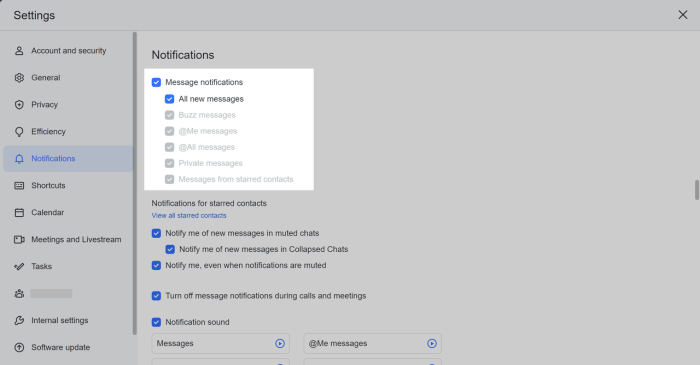
Social media notifications, while designed to keep you engaged, can easily become a significant source of distraction and hinder productivity. By strategically managing your notification settings, you can reclaim your focus and improve your overall well-being. This involves customizing sounds and vibrations, scheduling silent periods, and establishing best practices for managing the influx of information.
Customizing Notification Sounds and Vibration Patterns for a Personalized Experience
Optimizing your notification sounds and vibrations can significantly impact your experience. Instead of relying on the default, often jarring, sounds and vibrations, you can select more subtle and personalized options. For instance, you might assign a specific, less intrusive sound to notifications from close friends or family, while opting for a quieter alert for less urgent updates. Similarly, customizing vibration patterns can help you quickly distinguish between different apps or types of notifications without even looking at your phone. Many social media platforms offer a range of pre-set options, and some even allow you to upload your own custom sounds. Experimenting with different combinations will help you find what works best for you and reduces the likelihood of unnecessary interruptions.
Scheduling Notification Silence Periods
Scheduling periods of notification silence is crucial for maintaining focus and preventing interruptions during work or sleep. Most smartphones and many social media apps themselves offer “Do Not Disturb” modes or similar features. These features allow you to schedule specific times when notifications are muted or significantly reduced. For example, you could silence all notifications between 9 PM and 7 AM to ensure uninterrupted sleep. During work hours, you might only allow notifications from specific contacts or apps deemed essential for your immediate tasks. Third-party apps can enhance these capabilities. For example, “Focus To-Do” offers customizable focus sessions with notification blocking, while “Freedom” allows for broader control over distracting apps and websites, including social media platforms. These apps often provide granular control, enabling you to precisely define which apps are silenced and for how long.
Best Practices for Managing Social Media Notifications
Effectively managing social media notifications requires a proactive approach. The following checklist summarizes key best practices for enhancing productivity and well-being:
- Review and Customize Notification Settings Regularly: Check your notification settings across all your social media platforms at least once a month to ensure they align with your current needs and priorities. Remove notifications from apps you rarely use.
- Utilize Do Not Disturb Modes: Actively use your device’s built-in Do Not Disturb mode or similar features to silence notifications during focused work periods or sleep.
- Prioritize Notifications: Categorize notifications based on importance. Give high priority to notifications from close contacts or essential apps, and lower priority to less urgent updates.
- Turn Off Unnecessary Notifications: Disable notifications for less critical updates, such as likes, comments, or follower counts, unless they are genuinely important to you.
- Use Third-Party Apps Strategically: Consider using productivity apps to manage notifications and create focus sessions if built-in features are insufficient.
- Set Realistic Expectations: Remember that social media is not always urgent. Avoid the constant urge to check for new notifications. Schedule specific times for checking social media, rather than reacting to every alert.
- Be Mindful of Your Usage: Pay attention to how social media notifications impact your mood and productivity. Adjust your settings accordingly to promote a healthier relationship with technology.
Final Review
By implementing the techniques Artikeld in this guide, you can effectively manage the deluge of social media notifications and transform a potential source of stress into a manageable and even beneficial tool. Reclaim your focus, reduce anxiety, and optimize your digital well-being. Remember, taking control of your notifications is a crucial step towards a more balanced and productive relationship with social media.